
Introduction
When I migrated 10k products between systems at Loja Quase Tudo, I realized the importance of automating tasks to maintain efficiency and reduce human errors. Task automation is crucial for any system or application, allowing tasks to be executed regularly and consistently without the need for human intervention. In this context, tools like cron, systemd, and Bash scripts are essential for automating tasks and ensuring system stability and security.
Cron: Syntax and Real-World Examples
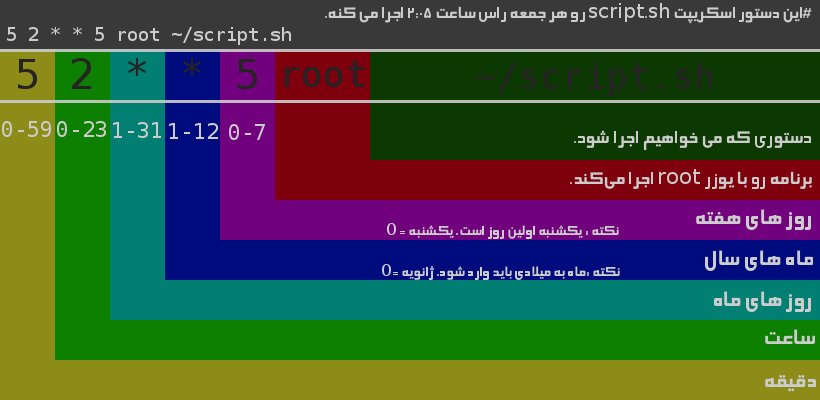
cron is a task scheduling tool that allows executing commands or scripts at specific time intervals. The cron syntax is simple and consists of five fields, separated by spaces, which specify the minute, hour, day of the month, month, and day of the week, respectively. For example, the following command will schedule the execution of a Bash script every day at 2:00 AM:
0 2 * * * /path/to/script.sh
Another example is scheduling the execution of a script for every weekday (Monday to Friday) at 8:00 AM:
0 8 * * 1-5 /path/to/script.sh
These examples illustrate the flexibility of cron in scheduling tasks for different time intervals.
Systemd Timers vs Cron
systemd is an initialization and service management system that also offers task scheduling features, known as timers. Although cron is a more traditional and widely used tool, systemd timers offer some advantages, such as the ability to run tasks in parallel and the possibility of configuring dependencies between services. However, the choice between cron and systemd timers depends on the specific use case and the system's needs.
Robust Scripts
To ensure the robustness of scripts, it is essential to implement error and exception handling mechanisms. This can be achieved using commands such as try-catch or if-else to handle unexpected situations. Additionally, it is crucial to test the scripts in different scenarios and environments to guarantee their stability and reliability. For example, in my inventory-service project, I used a Bash script to synchronize the product catalog with Mercado Livre, and implemented error handling mechanisms to deal with potential communication failures with the API.
Logging and Notifications
Logging and notifications are essential for monitoring task execution and identifying potential issues. This can be achieved using tools such as logger or syslog to record events and errors, and notification services like mail or slack to send alerts in case of failures. In my lead-pipeline project, I used a Bash script to send email notifications in case of errors during task execution.
Real-World Examples
Some real-world examples of task automation include:
- Scheduling a script to run a data backup every day at 11 PM;
- Using a
systemdtimer to run a software update service every Monday at 3 AM; - Implementing a Bash script to synchronize the product catalog with Mercado Livre every day at 8 AM.
Classic Errors
Some classic errors when working with task automation include:
- Forgetting to specify the full path to the script or command;
- Not testing the script in different scenarios and environments;
- Not implementing error and exception handling mechanisms;
- Not monitoring task execution and identifying potential problems.
Conclusion
Automation of tasks is fundamental to any system or application, allowing tasks to be executed regularly and consistently without the need for human intervention. Tools like cron, systemd, and Bash scripts are essential for automating tasks and ensuring system stability and security. By following the tips and examples presented here, it's possible to create robust and effective scripts to automate tasks and improve system efficiency.
Practical takeaways:
- Use
cronto schedule tasks at specific time intervals; - Implement error and exception handling mechanisms in scripts;
- Monitor task execution and identify potential problems;
- Test scripts in different scenarios and environments;
- Use tools like
loggerorsyslogto log events and errors.
Post glossary
- service
- A software unit with a well-defined responsibility, exposed through an interface and reusable by other system parts.
- api
- Application Programming Interface: a set of rules that lets one program talk to another, exposing data and features in a standardized way.